
System Integration
The Bruviti AIP integrates with enterprise systems through an API-first architecture with pre-built connectors for major CRM, ERP, FSM, and contact center platforms, database and file connectors for structured and unstructured data, and vision-based desktop automation for legacy systems without APIs.
Deployment Architecture
The platform sits between enterprise applications and infrastructure, connecting to existing systems through a layered architecture. For detailed deployment topologies (on-premise, private cloud, air-gapped, edge), see the Deployment Architecture documentation.
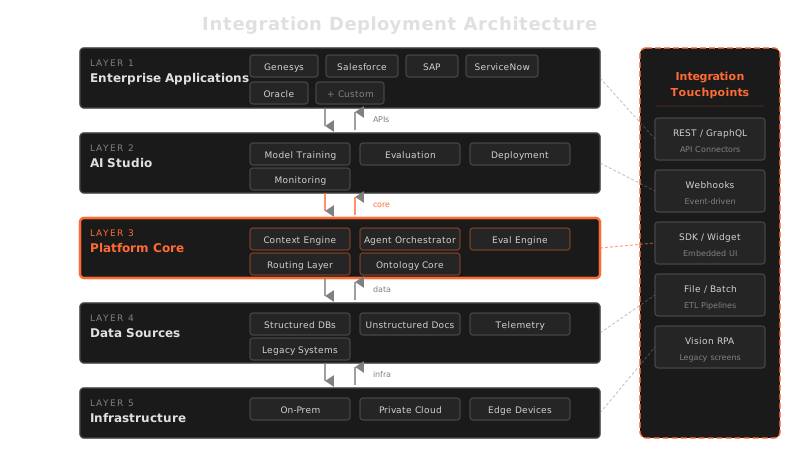
The platform's integration layer is bidirectional. It reads from enterprise systems (pulling service records, customer data, parts information) and writes back to them (updating case status, creating work orders, posting resolution notes). This bidirectional integration means the platform operates as part of the existing system landscape rather than as a standalone tool.
Integration Partners
The platform provides pre-built connectors for 11 enterprise platform partners, covering CRM, ERP, field service management, contact center, and cloud infrastructure.
| Category | Partner | Integration Type |
|---|---|---|
| Contact Center | Genesys | Agent assist, real-time context delivery, case routing |
| Contact Center | Nice | Agent assist, interaction analytics, workflow automation |
| Contact Center | Zendesk | Ticket enrichment, automated responses, knowledge base sync |
| CRM | Salesforce | Case management, installed base, service history, knowledge articles |
| CRM / Productivity | Microsoft | Dynamics 365, Azure infrastructure, Teams integration |
| ERP | SAP | Parts master, inventory, work orders, service contracts |
| ERP | Oracle | Asset management, procurement, inventory, financials |
| Field Service | IFS | Work order management, scheduling, parts logistics |
| Field Service | ServiceNow | ITSM, field service, asset management, workflow automation |
| Field Service | ServiceMax | Work orders, installed base, preventive maintenance, parts management |
| Cloud Infrastructure | AWS | Compute, storage, and ML infrastructure for private cloud deployments |
Pre-built connectors handle authentication, data mapping, rate limiting, and error handling for each partner platform. This eliminates the custom integration development that typically dominates enterprise AI deployment timelines.
Data Source Connectivity
The platform's data ingestion pipeline connects to eight categories of enterprise data sources. Each category requires different connectivity patterns and data handling.
| Data Source | Connectivity | Data Flow |
|---|---|---|
| Knowledge base articles | API or direct database access to KB systems and wikis | Bulk initial import + incremental sync on article updates |
| Product documentation | File system, document management systems, SharePoint | Document parsing (PDF, DOCX, HTML), versioned import |
| CRM data | Salesforce API, Dynamics API, custom CRM connectors | Customer records, installed base, service history — real-time and batch |
| Parts databases | ERP database connectors (SAP, Oracle), parts master APIs | Part numbers, compatibility, pricing, availability — incremental sync |
| Call logs | Contact center APIs (Genesys, Nice), recording storage | Transcripts, sentiment, resolution data — post-call processing |
| Service records | FSM APIs (ServiceMax, IFS, ServiceNow), work order databases | Work orders, repair history, technician notes — real-time and batch |
| Telemetry | IoT platforms, MQTT brokers, streaming APIs | Operating parameters, error codes, performance metrics — real-time streaming |
| Connected device data | Equipment controllers, PLC interfaces, OPC UA | Real-time status, configuration, diagnostics — streaming with buffering |
All data source connections operate within the enterprise perimeter — the platform connects to internal systems only. There are no external data dependencies or cloud-based data processing hops.
Connector Types
The platform provides four categories of pre-built connectors, each designed for a different integration pattern.
Database Connectors
Direct connectivity to relational and non-relational databases. Supports JDBC/ODBC for standard databases, native connectors for SAP HANA and Oracle, and document database connectors for MongoDB and similar stores. Database connectors handle connection pooling, query optimization, and schema mapping to the platform's internal data model.
API Connectors
REST and SOAP API connectors for enterprise platforms. Pre-built connectors for the 11 integration partners listed above handle authentication (OAuth 2.0, API keys, SAML), data mapping, pagination, rate limiting, and retry logic. Custom API connectors can be configured for any REST or SOAP endpoint using the platform's connector framework.
File Connectors
Processors for document and file-based data sources. Support includes PDF parsing with layout preservation, DOCX and HTML processing, CSV and Excel import, image processing (for scanned documents and technical diagrams), and file system watchers for automated import when new files appear in monitored directories.
Legacy System Connectors
For enterprise environments with 20–30 year old systems that predate modern API standards, the platform provides two legacy integration approaches:
- Protocol-level connectors — direct support for legacy protocols and encodings including EBCDIC character encoding (common in AS/400 and mainframe systems), fixed-width file formats, and legacy messaging protocols
- Vision-based desktop automation — for systems that have only a graphical user interface with no API or programmatic access (see Legacy System Integration below)
Legacy System Integration
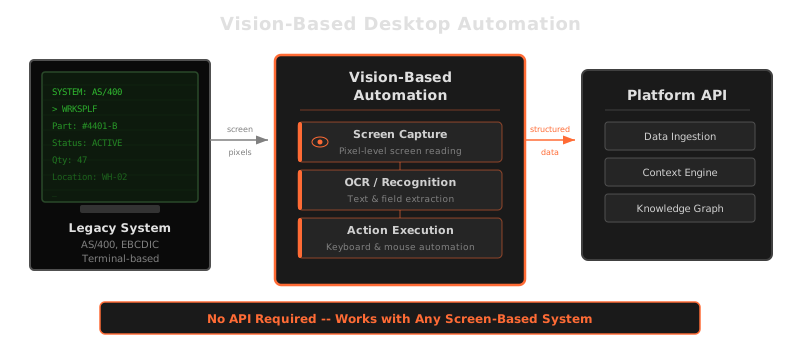
Many enterprise environments include legacy systems that have no API, no database access, and no file export — the only interface is a desktop application. Traditional integration approaches either skip these systems or require expensive custom middleware. The platform solves this with vision-based desktop automation.
How Vision-Based Integration Works
The platform's Vision AI module operates like a human user interacting with a desktop application:
- Screen monitoring — continuously watches the desktop screen using computer vision to understand the current application state
- Text recognition — applies OCR to read text content from any application interface, including legacy terminal emulators, desktop forms, and browser-based systems
- UI element detection — identifies interactive elements (buttons, text fields, menus, dropdowns) and understands their function based on visual context
- Action execution — performs mouse clicks, keyboard input, menu navigation, and application switching based on visual understanding of the interface
When to Use Vision-Based Integration
Vision-based integration is specifically designed for systems where no other integration method exists. It is the method of last resort — API connectors and database connectors are preferred when available because they are faster, more reliable, and easier to maintain. Vision-based integration fills the gap for legacy desktop applications, terminal-based mainframe interfaces, and third-party systems where the vendor provides no programmatic access.
API-first, vision as fallback: The platform's integration approach is API-first for systems that support it. Vision-based automation is used only when no API or database path exists. This layered approach ensures that integration decisions are driven by what the target system supports, not by a one-size-fits-all automation method.
Data Ingestion Pipeline
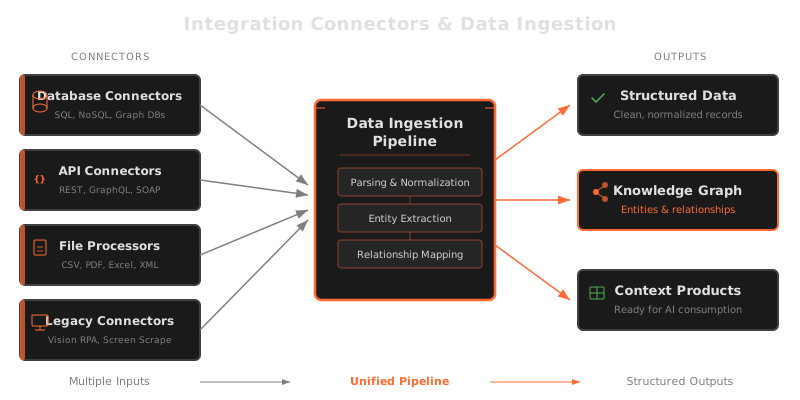
All integration connectors feed into the platform's unified data ingestion pipeline. This section describes how the integration layer connects to the ingestion architecture.
Integration Layer Responsibilities
The integration layer sits between the connectors and the ingestion pipeline, handling:
- Data normalization — converting source-specific formats into the platform's common data model before ingestion
- Change detection — identifying new, updated, and deleted records to enable incremental sync rather than full re-import
- Error recovery — handling connection failures, timeouts, and rate limits with retry logic and dead-letter queuing
- Audit logging — recording every data movement (source, destination, timestamp, record count) for the audit trail
Sync Patterns
Different data sources use different sync patterns based on their characteristics:
| Pattern | When Used | Examples |
|---|---|---|
| Real-time streaming | Continuous data that must be processed immediately | IoT telemetry, equipment status, real-time sensor data |
| Event-driven | Data that changes on specific triggers | New case created in CRM, work order status update, part availability change |
| Scheduled batch | Data that changes infrequently or where real-time is not required | Parts master updates, documentation revisions, knowledge base articles |
| On-demand | Data pulled when specifically requested by a workflow | Customer-specific pricing, current inventory levels, live shipping status |
Integration is not a one-time setup: Enterprise system landscapes evolve — new systems are added, APIs are versioned, legacy systems are decommissioned. The platform's connector framework is designed for ongoing maintenance: connectors can be added, updated, or replaced without affecting the ingestion pipeline or the knowledge fabric downstream.