
Network downtime waits for no one—stockouts and manual part searches cost you SLA credits every hour.
Parts lookup automation retrieves part numbers, checks multi-location availability, and suggests substitutes directly within service workflows, reducing manual searches and eliminating stockouts that delay network repairs.
Finding the correct line card or transceiver part number requires switching between catalogs, EOL databases, and inventory systems while customers wait on hold.
No visibility across regional warehouses means discovering a stockout after the case is opened, forcing emergency shipments or SLA breaches.
When EOL components fail, only senior staff know compatible alternatives. New operators escalate instead of solving, adding hours to resolution.
Automated parts workflows embed lookup, availability checking, and ordering directly into your service interface. When you open a case for a failed router module, the system instantly retrieves the part number from the device model and error code, checks inventory across all warehouses, and displays in-stock locations with expected delivery times—all without leaving your screen.
For EOL or out-of-stock components, the platform automatically suggests compatible substitutes based on technical specifications and compatibility matrices learned from past service records. One click orders the part and updates the case notes. The workflow eliminates swivel-chair searches and transforms parts lookup from a bottleneck into a background task.

Forecast demand for router line cards and optical transceivers by location and maintenance window, reducing emergency shipments while maintaining 99.9% fill rates.

Snap a photo of a failed switch module or fiber connector and instantly retrieve the part number, current availability, and compatible alternatives.
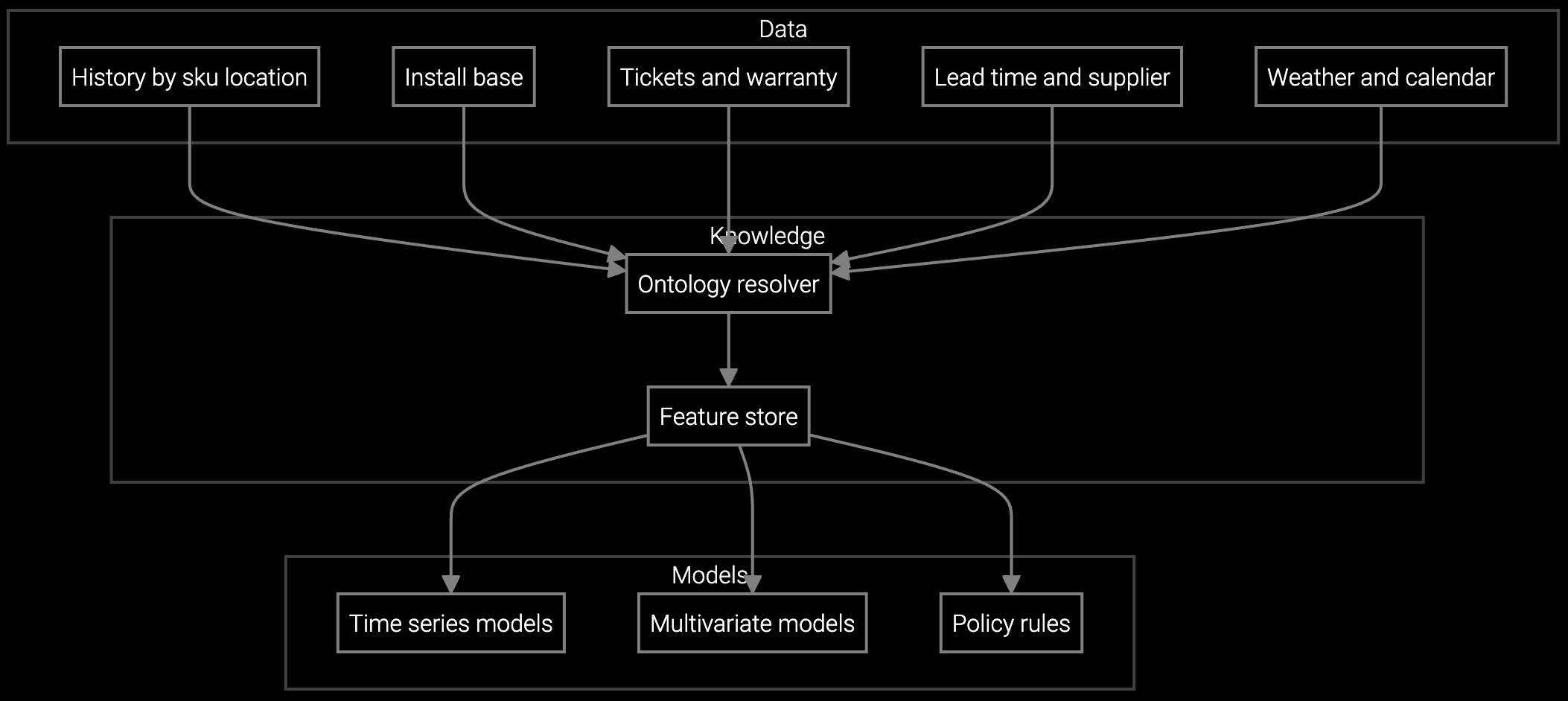
Project consumption for high-failure components like power supplies and fans based on installed base age, firmware version distributions, and seasonal traffic patterns.
Network equipment OEMs support thousands of router, switch, and firewall configurations across customer sites with 24/7 uptime requirements. Parts availability directly determines whether you meet four-hour MTTR commitments or pay SLA penalties. Operators juggle part number lookups across device generations, EOL component databases, and multi-region inventory systems while customers experience outages.
Automated parts workflows integrate device telemetry and error codes to identify failed components instantly, check stock levels across all warehouses in real time, and suggest tested substitutes for EOL parts. The system learns compatibility rules from your service history, so new operators can resolve parts requests as effectively as veterans without escalating every EOL component question.
The system analyzes device error codes, SNMP traps, and syslog entries to identify the failed component. For routers and switches, it maps specific error signatures to line cards, power supplies, or fan assemblies. If telemetry is ambiguous, it presents the top three likely parts with confidence scores so you can confirm the diagnosis.
The platform immediately suggests compatible substitutes based on technical specifications and your service history. It shows which alternatives have been successfully used for the same device model and error code, along with any configuration changes required. If no substitutes exist, it flags the case for emergency procurement and notifies the inventory team.
Yes. The system maintains an EOL component database and learns substitute mappings from past RMAs and service records. When a case involves an EOL part, it automatically suggests the current replacement model and indicates whether firmware updates are needed for compatibility. This eliminates the need to escalate EOL questions to senior staff.
Automated workflows query your ERP system APIs to check stock levels across all regional warehouses and display results within two seconds. The interface shows quantities, locations, and estimated delivery times based on customer site proximity. When you order, it automatically selects the optimal warehouse to meet your service SLA.
Yes. The parts automation layer integrates with ServiceNow, Salesforce Service Cloud, and proprietary ticketing systems via APIs. Part lookups, availability checks, and orders happen within your existing case interface without switching screens. All actions are logged automatically to the case record for audit and reporting.

SPM systems optimize supply response but miss demand signals outside their inputs. An AI operating layer makes the full picture visible and actionable.

Advanced techniques for accurate parts forecasting.

AI-driven spare parts optimization for field service.
Get a walkthrough with your actual device models, inventory systems, and service workflows.
Schedule Demo