
Every minute searching catalogs or calling warehouses delays repairs and drains productivity.
Automate parts workflows by integrating AI-powered lookups with inventory systems. Operators get instant part numbers, availability, and substitutes from equipment IDs or photos, then order with one click from their case screen.
Operators switch between multiple systems to find part numbers, check compatibility, and verify stock. Each lookup eats time that could be spent resolving service cases.
After finding the right part, operators must leave their workflow to place orders through separate procurement systems, creating delays and data entry errors.
When primary parts are unavailable, operators lack quick ways to identify compatible substitutes, leading to service delays or emergency shipments.
The platform embeds parts intelligence directly into service workflows. When an operator opens a case for a failed server component, drive array, or cooling unit, AI instantly identifies the part from equipment IDs, IPMI data, or uploaded photos. The system checks real-time inventory across all warehouse locations and suggests in-stock substitutes if the primary part is unavailable.
Orders execute with one click from the same screen where operators manage cases. The platform auto-populates shipping addresses from service records, routes urgent orders to expedited fulfillment, and updates case status automatically. Operators never leave their workflow, and every lookup and order is logged for demand forecasting.

Operators photograph failed server components or cooling system parts and instantly receive part numbers, availability, and compatible substitutes without manual catalog searches.

AI forecasts parts demand by data center location and time window, ensuring operators always find high-velocity components in stock at the nearest warehouse.
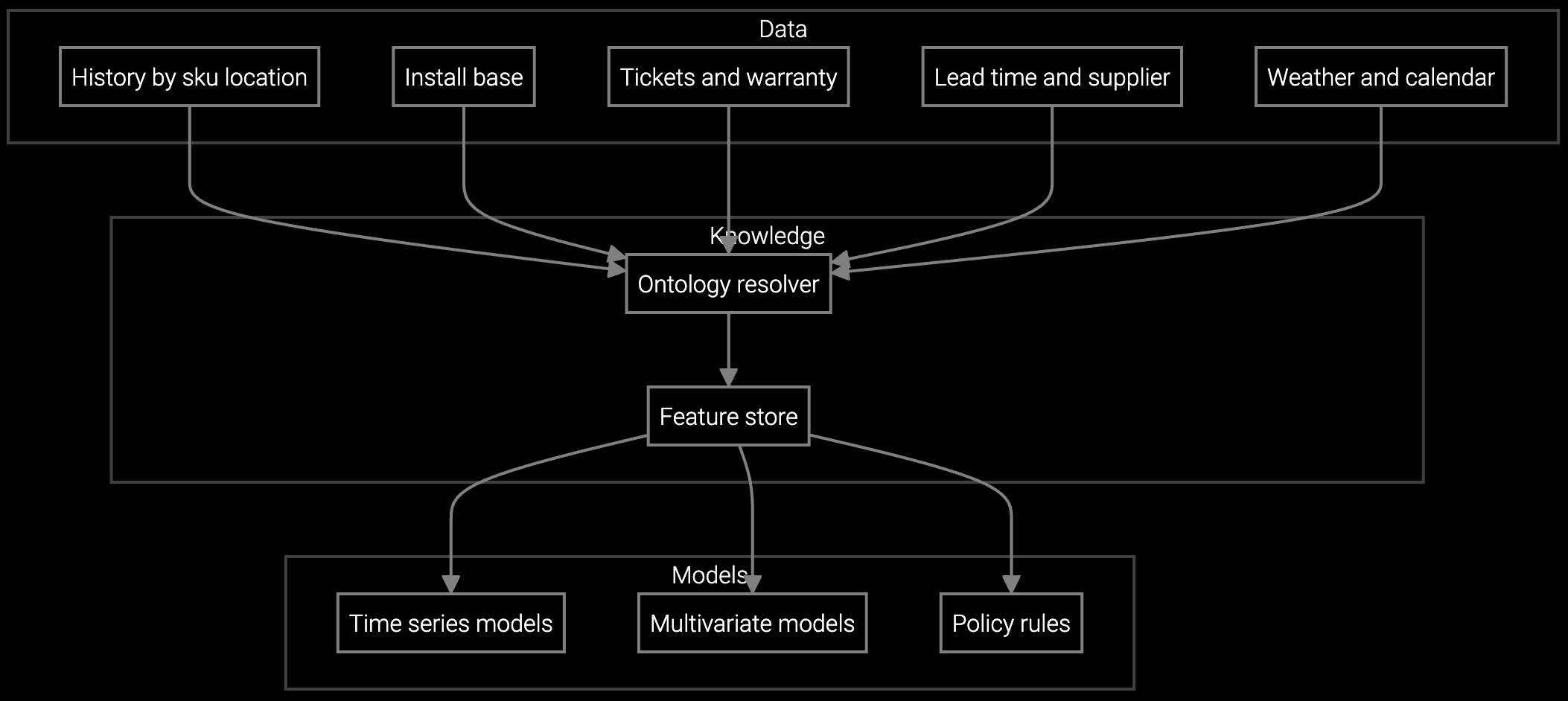
Projects consumption of drives, memory modules, and power supplies based on installed base age and failure patterns, reducing stockouts that delay repairs.
Data center OEMs manage thousands of servers, storage arrays, and cooling systems across geographically distributed facilities. When a drive fails or a power supply degrades, operators need instant access to part numbers, multi-location inventory visibility, and substitute matching for EOL components. Manual lookups across fragmented systems delay repairs and increase downtime risk.
AI integrates with IPMI and BMC telemetry to auto-identify failed components from error codes and serial numbers. The platform checks inventory across all regional warehouses, prioritizes the nearest stock, and suggests compatible substitutes for discontinued parts. One-click ordering routes urgent requests to expedited fulfillment based on SLA rules, and every transaction feeds demand models that optimize stocking levels.
The system parses IPMI error codes, BMC telemetry, and serial numbers to match components against parts databases. For photos, computer vision recognizes form factors, connectors, and labels to suggest candidate part numbers. Operators confirm the match, and the platform learns from corrections to improve accuracy over time.
AI queries compatibility matrices and service history to identify substitutes with equivalent specifications. The platform displays substitute options ranked by availability and proximity, so operators can choose an alternative without researching compatibility manually. This reduces emergency shipment costs and service delays.
Yes. The platform embeds ordering directly into the service workflow. After verifying part availability, operators click to order, and the system auto-populates shipping details from service records, applies SLA-based expediting rules, and updates case status automatically. No manual data entry or system switching required.
Every lookup and order is logged with equipment type, failure mode, and location. AI uses this data to project consumption by product line and geography, alerting inventory teams to replenish high-velocity parts before stockouts occur. Over time, stocking levels align with actual demand patterns rather than static safety stock rules.
Core integrations include the parts catalog database, ERP or inventory management system, and service case management platform. Optional connections to BMC telemetry feeds enable automatic part identification from equipment error codes. Most implementations also link to shipping and logistics systems for real-time order tracking.

SPM systems optimize supply response but miss demand signals outside their inputs. An AI operating layer makes the full picture visible and actionable.

Advanced techniques for accurate parts forecasting.

AI-driven spare parts optimization for field service.
See how Bruviti automates lookups and ordering from a single screen.
Schedule Demo