
Hyperscalers demand 99.99% uptime while you manage thousands of server SKUs across distributed sites—every technician visit costs margin.
Bruviti deployment data shows AI auto-summarizes 85% of service cases in under 7 seconds for data center equipment teams. Builders wire fault logs, telemetry, and parts data into one guidance layer so a technician sees the likely fix before dispatch, cutting manual case prep and repeat truck rolls.
Legacy field service platforms force you into closed ecosystems where custom integrations require expensive professional services. When BMC telemetry lives in IPMI streams and work orders live in SAP, you need flexible middleware that doesn't dictate your architecture.
Technicians arrive on-site with work order descriptions written days ago, unaware that BMC logs show thermal spikes in DIMM slot A3 or that the same rack experienced three PSU failures this month. Static data warehouses can't feed mobile apps in real time.
Off-the-shelf dispatch optimizers treat every service call the same, ignoring that hot-aisle failures cluster predictably or that certain server generations fail within weeks of specific BIOS updates. You need models you can retrain on your own telemetry and failure patterns.
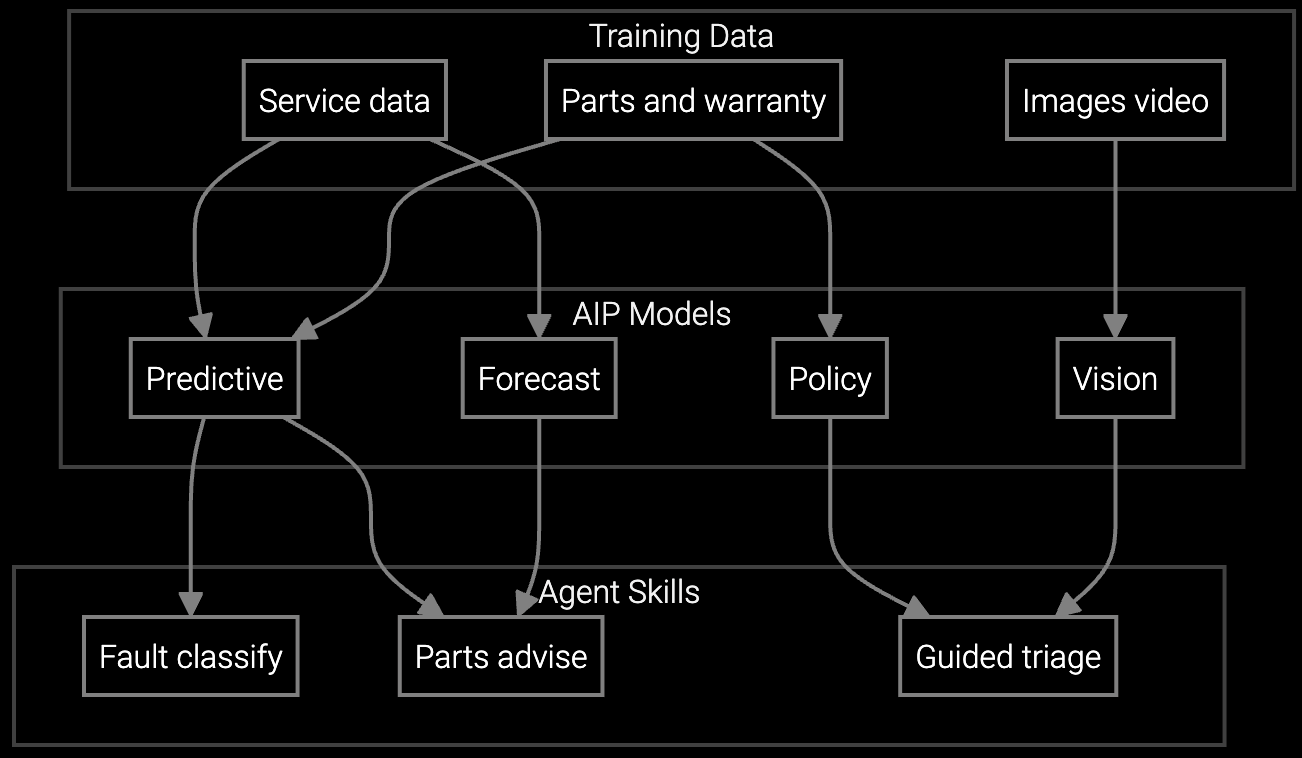
Bruviti's platform uses an API-first design where Python SDKs ingest IPMI/BMC telemetry streams, your existing FSM (SAP, Oracle, ServiceMax) handles scheduling, and RESTful endpoints deliver technician context to mobile apps you control. The system doesn't replace your stack—it augments it with predictive dispatch, parts pre-staging recommendations, and on-site diagnostics that run on your infrastructure.
Deploy custom models trained on your historical RAID failures, thermal events, and power anomalies. Retrain weekly using your own data pipelines. The platform exposes model endpoints you call from your dispatch logic, avoiding proprietary rule engines. When a BMC reports DIMM errors exceeding threshold, your code decides whether to auto-dispatch, pre-stage parts, or escalate—Bruviti provides the intelligence layer, not the workflow lock-in.

Pre-stage DIMMs, PSUs, and fans based on BMC error patterns and historical failure clusters in your data center deployments.
Mobile API delivers real-time thermal maps, RAID rebuild status, and repair procedures tailored to specific server SKUs and BIOS versions.

Correlate current BMC logs with historical thermal events, firmware bugs, and cooling infrastructure failures across your installed base.
Data center OEMs manage server, storage, and cooling equipment across customer sites with heterogeneous FSM systems—SAP for enterprise accounts, Oracle for hyperscale deployments, custom tools for regional data centers. Bruviti's headless platform connects to IPMI/Redfish telemetry streams via Python collectors you deploy, enriches work orders through REST APIs your FSM calls, and serves mobile context through endpoints your apps consume.
Start by integrating one product line where BMC telemetry quality is highest and repeat-visit costs are most visible—typically compute nodes with predictable DIMM and PSU failure modes. Use the Python SDK to build custom dispatch models that factor in rack topology, hot-aisle thermal patterns, and parts inventory at each site. Models run in your VPC; inference latency stays under 200ms for real-time dispatch decisions.
The platform ingests IPMI SEL logs, Redfish event streams, SNMP traps, and custom JSON payloads via webhook. Python SDK includes parsers for common BMC formats from Dell iDRAC, HPE iLO, and Supermicro IPMI. You can extend parsers for proprietary telemetry using the base collector class.
Yes. Bruviti provides model training pipelines you run in your environment using your telemetry, work order history, and parts consumption data. Training jobs run via Python SDK; you control data residency, training frequency, and model versioning. No data leaves your infrastructure during training.
REST APIs expose work order enrichment endpoints your FSM calls before technician dispatch. Typical flow: FSM creates work order, calls Bruviti enrichment API with equipment serial and symptom, receives predicted parts list and historical context, attaches to work order. No FSM schema changes required; integration lives in middleware you control.
Your mobile app calls context APIs with work order ID and equipment serial; platform returns JSON with real-time BMC status, predicted failure modes, recommended procedures, and parts staged at site. TypeScript SDK includes React Native example components. API response time averages 180ms; suitable for real-time on-site lookup.
All model inference and data processing use standard Python libraries (scikit-learn, PyTorch). Model weights export to ONNX format for portability. API contracts follow OpenAPI 3.0 spec; you can rebuild equivalent endpoints using your models. No proprietary runtimes or custom languages required—if you leave, your code and models remain functional.

How AI bridges the knowledge gap as experienced technicians retire.

Generative AI solutions for preserving institutional knowledge.

AI-powered parts prediction for higher FTFR.
Get sandbox access to Python SDKs, sample telemetry datasets, and API documentation in 48 hours.
Request Developer Access